Setup
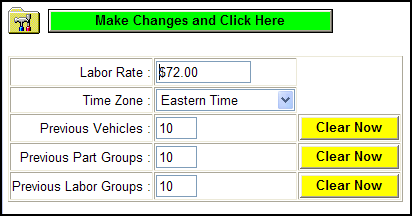
The next item to address is shop specific information and preferences. From the menu on the left side of the screen, use your mouse to select Setup. Upon a single-click, there the following will display. In the box next to Labor Rate, enter the proper per hour rate your shop will be charging. Now select the proper time zone for your physical location. The next three items are initially set to 10; you may adjust at any time to meet your needs or desires. The purpose of each is to limit the amount of previous information that is saved and displayed for you – these are YOUR shortcuts. For instance, when Previous Vehicles is set to 10, that is how many Previous Vehicles you have looked up in the past. These previous vehicles will be saved and displayed the next time you are making a vehicle selection. These functions are viewed when looking up parts and are displayed as Previous Vehicles, Previous Part Groups and Previous Labor Groups.
Upon adjusting the Previous item values, you must click the green button labeled Make Changes and Click Here to save. Please note that any time you apply changes WEBLINK will logoff as part of saving the changes. When you login again, the changes you just made will be available for usage.
Tip – Leave this at the first setting and try it out, in a short time you will know which way YOU want these to go. It is very quick and simple to adjust at any time.
